Top Area Header is a header menu displayed at the top of your site. It is generally used to display date and time, social media icons, and other important navigation menus that aren’t displayed in the Main Area Header.
- Go to your WordPress Dashboard, head to Appearance → Customize → Header Settings
- Go to Top Header option, where you can see various toggle options and a drop-down menu.
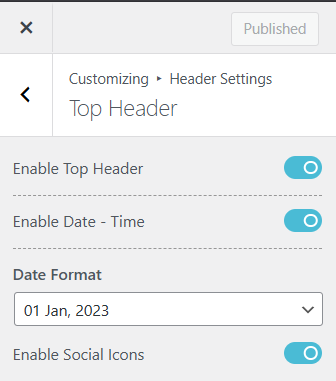
- Enable the Top Header to make it appear in the top area of your website.
- Toggle on the ‘Enable Date – Time’ and a drop-down menu will be prompted where you can select the type of format you want for your date and time to appear in your website.
- And if you want Social Icons on your Top Header, Toggle on the ‘Enable Social Icon‘ option.
- Add Text Color and Background Color for your Top Header from the Style tab beside the General tab
- Click on the Publish button to save your changes.