This option is available for Purenote Pro only. To use this and many more features, make sure that you have Purenote Pro
Post elements are those that appears below your post’s title. It includes elements like Category of the post, date, author and tags. With Purenote Pro, you can easily customize all the showcased elements in Posts. You can also choose effects when someone hovers over your posts, to make it more engaging.
To do so:
- Go to your WordPress Dashboard and then head to Appearance → Customize.
- Look for General Settings in the customizers and head to Posts option.
- At the top you’ll see a “Post Thumbnail Hover Effect” option. Click on the drop-down menu to choose from given two hover effect options.
Hover Effect 1: Your thumbnail will zoom a little
Hover Effect 2: Your thumbnail will shine all across.
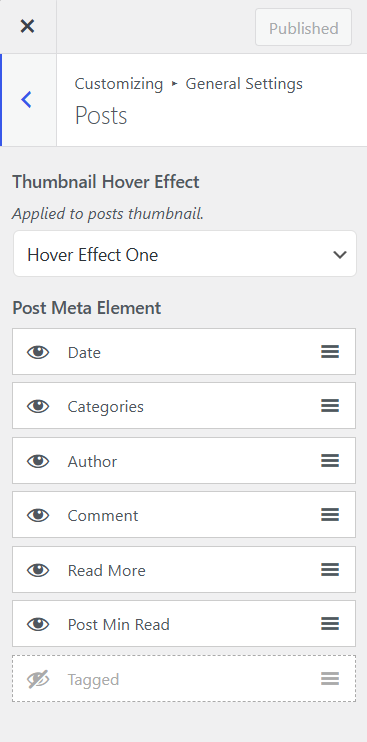
- In Post Data Element, you have seven different options and you either show them on your Post section or hide them.
- Categories section enables the category of the post to be shown
- Date shows the date your post was published or updated
- Author will show who wrote and published your post
- Tagged shows what tags are you using for your post.
- Comments will show what your users are talking about.
- Read More will allow your users to look for more of your content
- Post Min Read shows how much it will take to read the article.