Purenote also allows you to add sticky post at top of your Frontpage with custom label.
To do so;
- Go to your WordPress Dashboard, then Appearance → Customize → General Settings
- Then, look for Sticky Posts option and click on it.
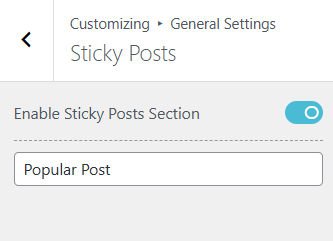
- Toggle on “Enable Sticky Posts Section“, if you have not yet. (It will remain off as default)
- A Text label will be prompted, add your custom label to it like “Popular Post“, “Recommended for you” or any other your prefer.
- Click on ‘Publish‘ button after you’ve made your changes.