This feature is available on Purenote Pro only. Purchase the Premium edition of Purenote to get access to this feature.
Purenote Pro allows you to re-order front-page sections in any order or fashion you like, which was not possible in the free version. For instance, you can reorder the bottom full width section and place it just above the Web Stories section and more. To do that,
- First open your wordpress dashboard with your login credentials.
- Then open your theme customizer by navigating to Appearance → Customize.
- Then navigate to Frontpage Settings → Reorder Section to actually realign items as needed.
- The Re-order section contains the list of all created frontpage blocks. You cannot just re-order the frontpage sections but also hide or unhide them.
- Drag and drop any one of the frontpage block to your preferred position to change the default position.
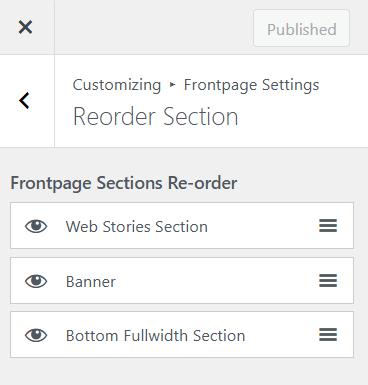
- You can also click on the eye icon next to the Frontpage block to hide that block.
- Eventually, click on Publish button to save and publish the changes made.