News Express enables you to customize your 404 Error Page efficiently.
- Go to your WordPress Dashboard, then navigate to Appearance → Customize → Innerpage Settings
- Look for 404 Error from the given options
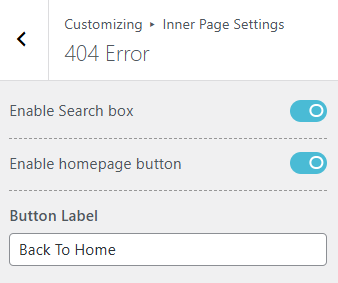
There are three options for you to customize in 404 Error section.
- Toggle on or off the ‘Enable Search box‘ button if you want a search box to appear in the error page.
- Do the same for ‘Enable homepage button‘ if you want a button that redirects your user to the home.
- Give the Homepage button a name as per your preferences in the “Button Label“. Keep in mind that disabling the Homepage button will restrict you to name it.
- Click on
 button to save your changes.