Skip to content

News Express

  • Home
  • Blog
  • Support
  • FAQs
  • Visit Site
  • Home
  • FrontPage Settings
  • Basics of Top FullWidth

Basics of Top FullWidth

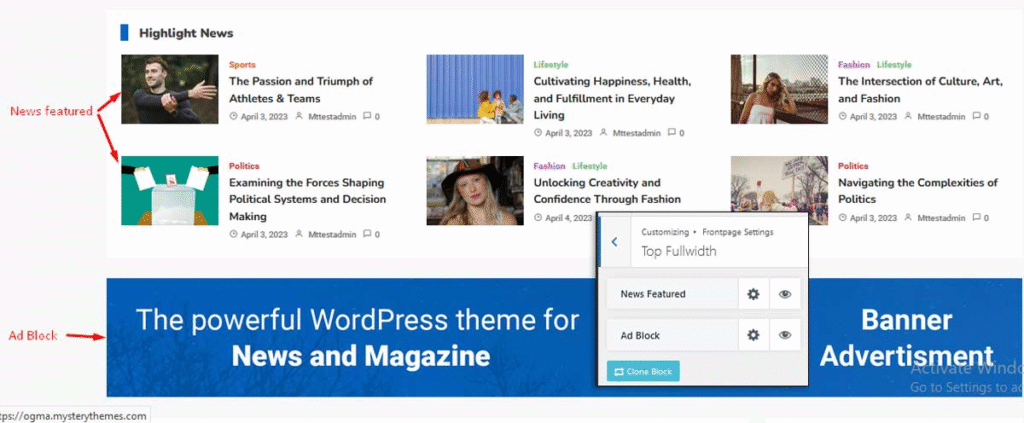
Top FullWidth section

The Top FullWidth Section is divided into News Featured and AD Block. Based on your preference, you can easily tweak the settings to align them as per your needs.

Post navigation

Previous: How to Set Background Color/ Image for the Main Banner?
Next: How to Configure News Featured Settings?

Categories

  • Get Started With News Express4
  • Installation and Updates3
  • News Express Pro Module13
  • General Settings8
  • Header Settings4
  • Typography1
  • FrontPage Settings8
    • Main Banner Settings2
    • Middle Content Settings2
    • Bottom FullWidth Settings3
  • Innerpage Settings3
  • Footer Settings3
  • Homepage Settings1
  • Menu Settings1
  • Widget Settings2

Still Got Queries ?

Let us know how can we help you

Contact Us

Online Support

We offer a top notch support via forum, live chat, support ticket & regular updates.
Get Support

Detailed Documentation

Our documentation is as through as possible. Each theme options is detailed & easy to follow
Online Documentation

Beautiful Demos

Our theme have beutiful demos for free and pro which can be downloaded via one click demo import plugin.
Online Demos
Proudly powered by WordPress | Developed by: Mysterythemes