News Express allows you to customize your Archive pages efficiently with various options. The free version of the theme enables you to customize your Archive page’s style and gives you the option to enable or disable Archive page title prefix.
To do so:
- Go to your WordPress Dashboard, then navigate to Appearance → Customize → Innerpage Settings
- Look for Archive Pages from the given options.
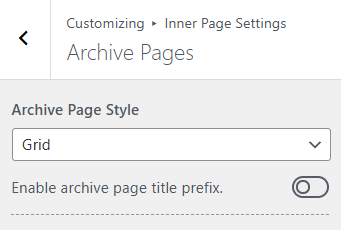
- Choose your preferred Page style for your Archive pages from the given drop-down menu. You’ll have three options: Classic, Grid or List. The layout will appear as the name suggests.
- Page Title prefix shows the particular category of that post. Enable or Disable it based on your preferences.
- Click on
 button to save your changes.