News ticker is a news scroll that is generally positioned at the top of the page to highlight news. It is a considered an indispensable ingredient for a news website.
News Express Pro allows you to enable News Ticker and provide further customization on the ticker for more personalization.
You can also choose layouts for your news ticker and choose colors to efficiently customize based on your own preferences.
In order to do that,
- First open your admin dashboard with your login credentials
- Then, open your theme customizer by navigating to Appearance → Customize
- After that, navigate to Header Settings → News Ticker option to configure settings for News Ticker.
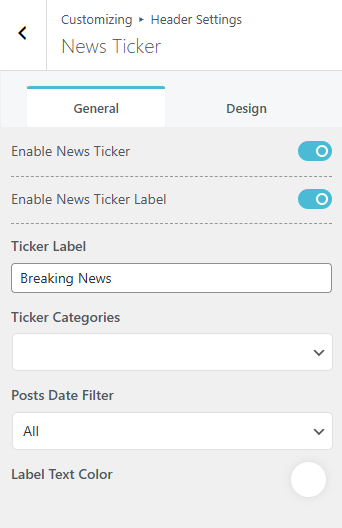
- First make sure ‘Enable News Ticker‘ and ‘Enable News Ticker Label’ are toggled on
- You can also choose to display Ticker posts categorically instead of displaying of all the posts as News Ticker by selecting from Ticker Categories dropdown.
- Choose your date filters from the ‘Post Date Filter‘ drop-down menu and choose the label text color from the palette below it.
On the Design tab,
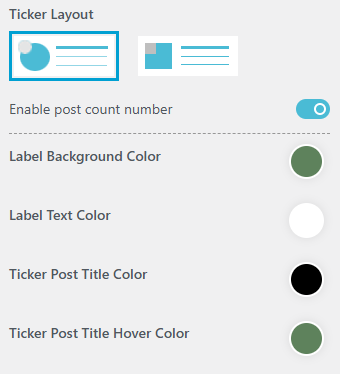
- Choose your preferred layout from the given option.
- If you want a Post Count Number for the ticker, toggle on the ‘Enable post count number‘ option.
- Choose color for various sections by clicking on the palette below the toggle option.
- After making your changes, don’t forget to click on
 button to save and publish the changes.