With News Express, you can also customize your single posts. Utilizing such customizations can help harness more engagements from your users.
To do so:
- Go to your WordPress Dashboard, then look for Appearance → Customize → Inner Page Settings in the customizer pane.
- Go to Single Posts from the given options.
Here, you’ll have three different options for free version of News Express: Layout, Author Box Toggle and Related Posts section
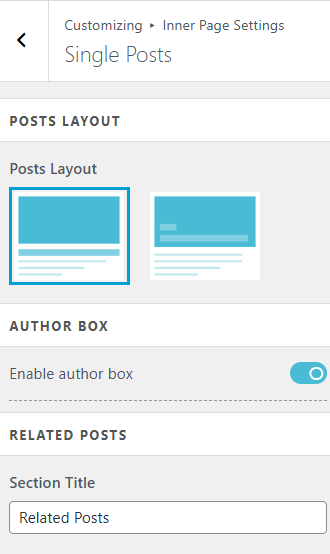
- Choose from given two layouts for your Single Posts based on how you want to display your posts.
- Toggle on or off the ‘Enable Author Box‘ option, if you want to show the authors of the post in the Single Posts.
- Add your custom name for ‘Related Posts’ section which displays random and related posts below your single posts.
- Click on
 button to save your changes.